
Ultimate HOT IPTV Player Setup – Step-by-Step Guide 2025
HOT IPTV Player setup has never been easier! This complete guide walks you through installing HOT IPTV Player on Smart TV, Firestick, or other compatible devices, adding your M3U playlist, and enjoying live TV, movies, and series instantly. No technical skills required.
HOT IPTV Player Setup – Download & Install the App
Open your device's app store (Google Play, LG TV Store, Samsung TV, or Apple Store). Search for HotPlayer. On Firestick, use the Downloader app with code 395800 to install HOT IPTV Player.

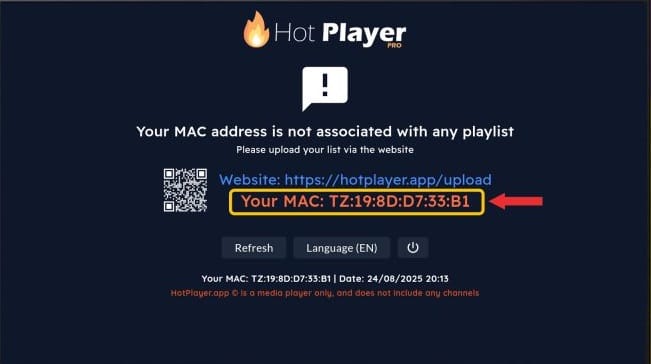
Find Your MAC Address for HOT IPTV Player setup
Once installed, open the HOT IPTV Player app. You will see your MAC address and a web link on the welcome screen. Note them down; they are needed to link your M3U playlist.
Upload Your Playlist Online
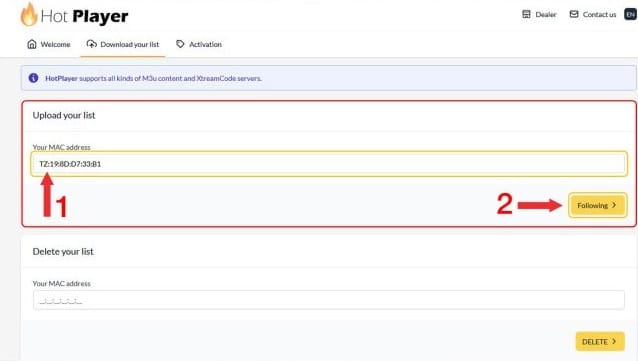
On your computer or smartphone, visit https://hotplayer.app/upload and enter your MAC address.
- Paste your M3U URL in the Playlist URL field.
- Give your playlist a name (e.g., My Favorite IPTV).
- Click Save to activate your playlist.
Activate Your Playlist in HOT IPTV Player
Return to your Smart TV or Firestick and refresh/reload the HOT IPTV app. Wait a few seconds for your playlist to load. You will see Live TV, Movies, Series, and Radios ready to enjoy.
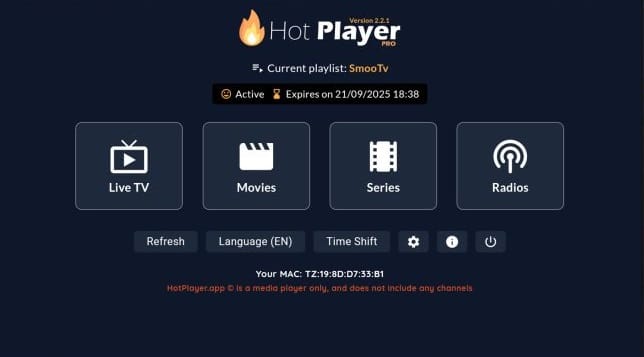
Enjoy HOT IPTV Player – Live TV, Movies, and Series
Everything is set! Sit back, relax, and enjoy your IPTV channels directly from your TV or Firestick device. HOT IPTV Player setup ensures smooth, uninterrupted streaming.
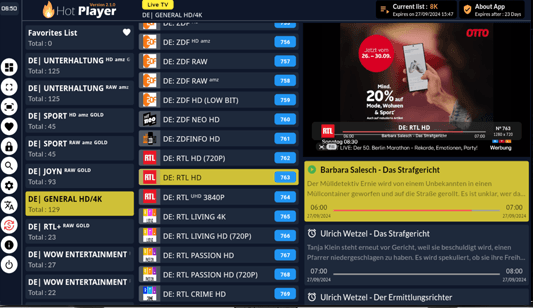
Why Choose HOT IPTV Player?
- Intuitive and fast interface for easy navigation.
- Compatible with multiple devices: Smart TVs, Roku, Android, Firestick.
- Supports M3U and M3U Plus playlists for flexible use.
- 30-day free trial to test all features.
- Affordable annual plan at just €4.99.
- Quick and beginner-friendly setup process.
Need more IPTV guides? Check our other HOT IPTV tutorials for Smart TVs and Firestick.
HOT IPTV Player Setup – Frequently Asked Questions
- Can I use HOT IPTV on multiple devices? Yes, it works on Smart TVs, Firestick, and mobile devices.
- How do I refresh my playlist? Simply reload the app or restart your device.
- Is HOT IPTV free? You get a 30-day free trial; afterwards, an annual plan is available.